Cepstra 1.0 · An AI DJ for Windows

It mixes your music. Then it shows its work.

Cepstra hears the vocals, drums and bass in every song, plans each blend on the phrase and in key, and tells you why it mixed the way it did. On your PC, offline.

An animated picture of one Cepstra mix: the outgoing song's waveform and the incoming one's across a bar grid, a playhead moving through the blend, and notes that appear as it reaches each decision.

    Free · v1.0.0 · 563.4 MB · Windows 10 (2004+) & 11 · Microsoft Store: coming soon

    Auto DJ

    How it listens

    Before a song plays, Cepstra has already heard it.

    The first time it meets a song, it works out what a DJ would want to know, once, in the background, and keeps it. You can play while it listens.

    A sketch of what Cepstra works out for one songsections · waveform · bar grid · stems
    • Stems

      Vocals, drums, bass and the rest, separated by Demucs, a neural network, and measured in every half-beat. That's how it knows a song's intro is drums only, and never lets two singers talk over each other.

    • Beat & key

      A bar grid and the key, so blends stay on the beat and in tune. Keys show as Camelot codes (8A, 9B), so you can mix harmonically too.

    • Sections

      Intro, verse, chorus, drop, break and outro, drawn on the waveform. It leaves a song at the end of a phrase, not halfway through a chorus.

    • Vibe

      Genre, mood and a sound fingerprint from PANNs, a second network, so the next song feels like it belongs after this one.

    cepstrum (n.): the spectrum of a spectrum, a way of hearing the texture of a sound. That's where the name comes from.

    How long Cepstra takes to listen to one song
    Listening onPer songStems for a deck
    A graphics card (NVIDIA, AMD or Intel, through DirectML)about 12 sabout 11 s
    The processor onlyabout 65 sabout 55 s

    Measured on a laptop with an RTX 4050, plugged in, songs about 2 minutes long. Each song is heard once.

    Features

    A full DJ setup, with a DJ who knows your music.

    Every screenshot below is the app itself, playing Creative Commons music.

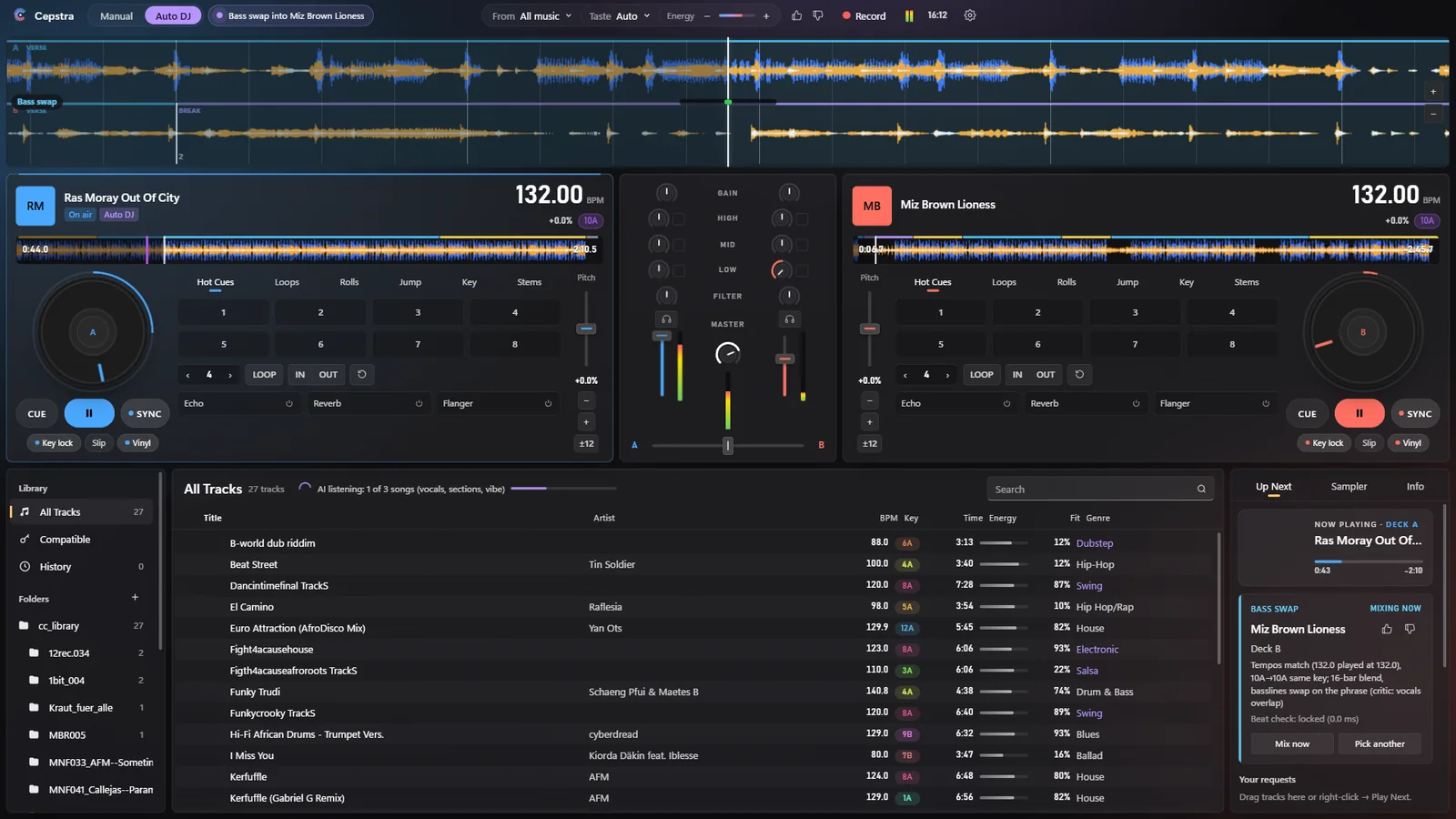
    Cepstra mid-mix: both decks playing at 132 BPM with section bands on the waveforms, and Up Next explaining the bass swap: tempos match, 10A to 10A same key, a 16-bar blend with the basslines swapping on the phrase.

    Auto DJ

    It mixes, and it tells you how.

    Hand over the decks and Cepstra plays your music as a set. It picks the next song by tempo, key, energy and vibe, finds the mix point, and chooses a technique for the moment: a long bass swap for a groove, an echo out to reset, two bars of drums to walk the tempo, a rewind straight into a chorus. A critic checks every plan before it plays, and the log says why. Take the decks back whenever you like; it picks up where you leave off.
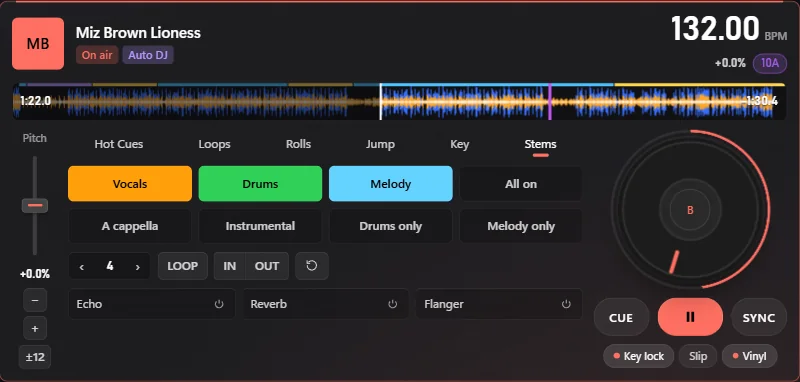
    Deck B's Stems pads: Vocals, Drums and Melody switched on, with A cappella, Instrumental, Drums only and Melody only one press away.

    Stems

    Mix with the parts of a song.

    Every deck can drop or bring back the vocals, the drums and the melody on their own, or jump straight to a cappella, instrumental, drums only or melody only. Auto DJ uses them too: a cappella teases, drums-first entries, and vocal swaps without two voices clashing.

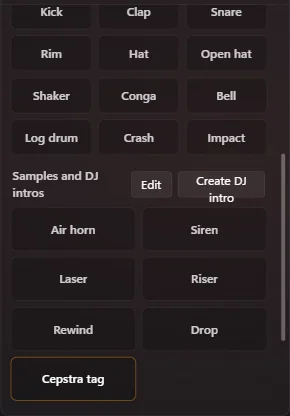
    The Sampler panel: drum sounds from kick to log drum, sample pads (air horn, siren, laser, riser, rewind, drop), a Create DJ intro button and a Cepstra tag intro pad.

    Drums, samples, intros

    A drum machine that follows the beat.

    • Drum sounds, and a drum machine whose grooves and fills follow the playing song
    • Pads for air horns, risers and rewinds
    • DJ intros: type a line for a Windows voice, or record your own
    • Auto DJ uses them with restraint, never over a vocal
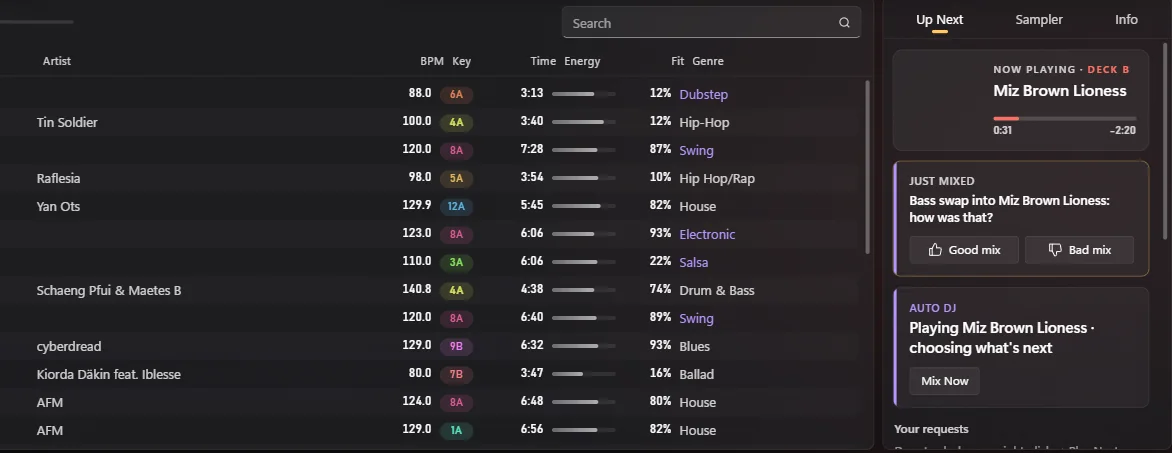
    The library with each song's tempo, its key badge in Camelot colours, length, energy, fit and genre, beside Now Playing and a Just mixed card asking how the last mix was.

    Library

    Harmonic mixing, in colour.

    Every song shows its key in the Camelot colours, its tempo, its energy and how well it fits your taste. Compatible songs are one click away, and new songs in your folders appear by themselves.

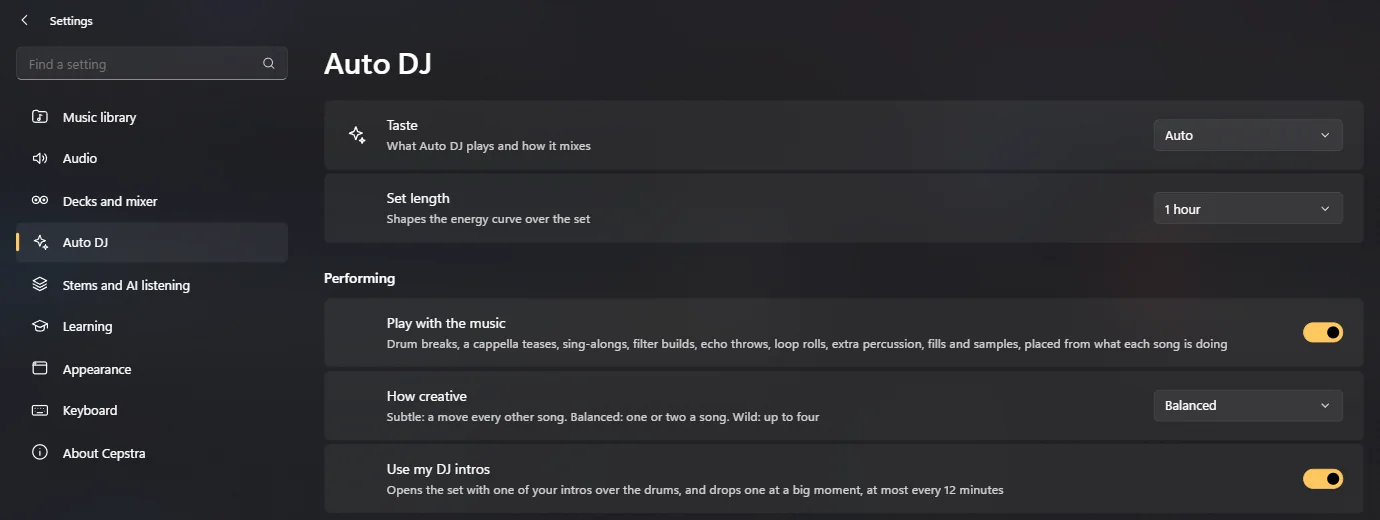
    Cepstra's Auto DJ settings: taste, set length, playing with the music, how creative it is, and whether it uses your DJ intros, in a Windows 11 style settings page.

    Settings

    You set the style, it plays the set.

    Choose a taste and a set length, how creative it gets (a move every other song, or up to four), and whether it opens with your intros. Settings looks and works like Windows 11's own.

    Learns

    It learns how you mix.

    Thumbs up or down a mix and it remembers. DJ yourself for a while and it learns from your blends, on your PC.

    Record

    Keep the set.

    Press Record and the whole set is saved as a 320 kbps MP3 in Music\Cepstra Mixes.

    Decks

    DJ it yourself.

    Two decks with key lock, sync, hot cues, loops, rolls, three effects each and a three-band mixer, on screen or on a DJ controller.

    Privacy

    Your music, on your PC. That's all.

    Cepstra was built to work with no connection at all, and it keeps it that way.

    No network

    Never connects to the internet.

    No account, no telemetry, no update checks of its own. The window refuses any request that isn't to your own PC, and so does the AI worker.

    Your music

    Your songs never leave your PC.

    Analysis, stems and cover art are kept in Cepstra's folder in your user profile, and nowhere else.

    Microphone

    Only when you record an intro.

    It listens only while you record your own DJ intro, and keeps that recording only if you add it to a pad.

    Learning

    It learns locally, and forgets on request.

    How you mix stays on your PC to teach Auto DJ. Turn it off, or delete it, in Settings → Learning.

    Recordings

    Your sets are your files.

    Recorded mixes are MP3s in Music\Cepstra Mixes. Nothing is uploaded.

    Updates

    No update checks, no phoning home.

    Cepstra never looks online for updates. New versions are posted on this page, and the Microsoft Store will update its copy once it's listed there.

    Read the full privacy policy →

    Get Cepstra

    From install to first set in a few minutes.

    1. Download and install

      Get Cepstra-Setup.exe (563.4 MB), free. It installs for your account, no administrator rights, and brings everything it needs: no Python, no codecs, no account.

    2. Choose your music folder

      MP3, M4A, FLAC, WAV, OGG and more. It reads tempo and key right away, then listens more deeply in the background.

    3. Hand over the decks

      Press Auto DJ and let it play, or DJ yourself and hand over when you want a break.

    About the Windows warning. This first release isn't code-signed yet, so Windows SmartScreen may say "Windows protected your PC". Check the checksum below, then choose More info → Run anyway.
    ced92938fd766542ebe90165f1cc54a0ba47bfc47b859f25051de3dfdd161979

    PowerShell: (Get-FileHash .\Cepstra-Setup.exe -Algorithm SHA256).Hash

    PriceFreeOSWindows 10 2004+ / Windows 11CPUx64Diskabout 1.3 GB, plus stemsGraphicsany DirectX 12 card speeds up listening (optional)

    FAQ

    Questions, answered.

    Is it free?

    Yes. Download it, install it and use it, with no account, ads or time limit. If you'd like to support it, there's a page for that.

    Does it need the internet?

    No. Cepstra works entirely offline, including the AI, and never connects to the internet. That includes updates: new versions are posted here (and through the Microsoft Store once it's listed).

    Which music does it play?

    Your own files: MP3, M4A and AAC, FLAC, WAV, OGG, Opus, AIFF and WMA. It doesn't stream from Spotify or other services.

    Can I DJ myself?

    Yes. Two decks with key lock, sync, hot cues, loops, rolls, effects, stems and a mixer, played with the mouse and keyboard or a DJ controller. Take over from Auto DJ at any moment, and hand back when you want a break.

    Does it work with DJ controllers?

    Yes. It has built-in mappings for the Pioneer DDJ-FLX4, DDJ-FLX6, DDJ-REV5 and DDJ-REV7 (not the REV7's motorised platters) and the Hercules DJControl Inpulse 300 and 500. Any other MIDI controller can be mapped control by control with MIDI Learn in Settings, and a built-in tester shows what each control sends. Cepstra can also play your headphone cue through the controller's own sound card.

    Do I need a powerful PC?

    Any 64-bit Windows 10 (2004 or later) or Windows 11 PC runs it. A DirectX 12 graphics card makes the first listen to each song about five times faster.

    Why "Cepstra"?

    It comes from cepstrum, the spectrum of a spectrum: a way of hearing the texture of a sound, used in speech and music analysis.

    Why does Windows warn me when I run the installer?

    This first release isn't code-signed yet, so SmartScreen doesn't recognize the publisher. Compare the SHA-256 checksum above with your download, then choose More info → Run anyway.

    Is it on the Microsoft Store?

    Soon: it's on its way through Microsoft's review. The Store version is the same app, also free, and the Store keeps it updated.

    How do I uninstall it?

    Settings → Apps → Installed apps → Cepstra → Uninstall. Your library data and recorded sets stay on your PC until you delete them.

    Let it play the next one.

    Free · v1.0.0 · 563.4 MB · works offline · All releases ↗